
Built in Kenya, for how African businesses actually run
Cloud ERP software to run your whole business
Covadesk replaces the spreadsheets, WhatsApp approvals and disconnected apps holding your operation together. Procurement, stock, production, sales, delivery, finance, HR and payroll — with KRA eTIMS, M-Pesa and Kenyan payroll built in.
No credit card required · Import your existing data · Go live in weeks, not quarters
- modules live today
- 34modules live today
- industry packs
- 16industry packs
- KRA invoices transmitted
- eTIMSKRA invoices transmitted
- payments matched
- M-Pesapayments matched
Product tour
Every screen answers a question somebody asks every day
Dashboards that lead with what needs attention, tables that tie back to the ledger, and the same clean design in every module. Shown here with sample data.
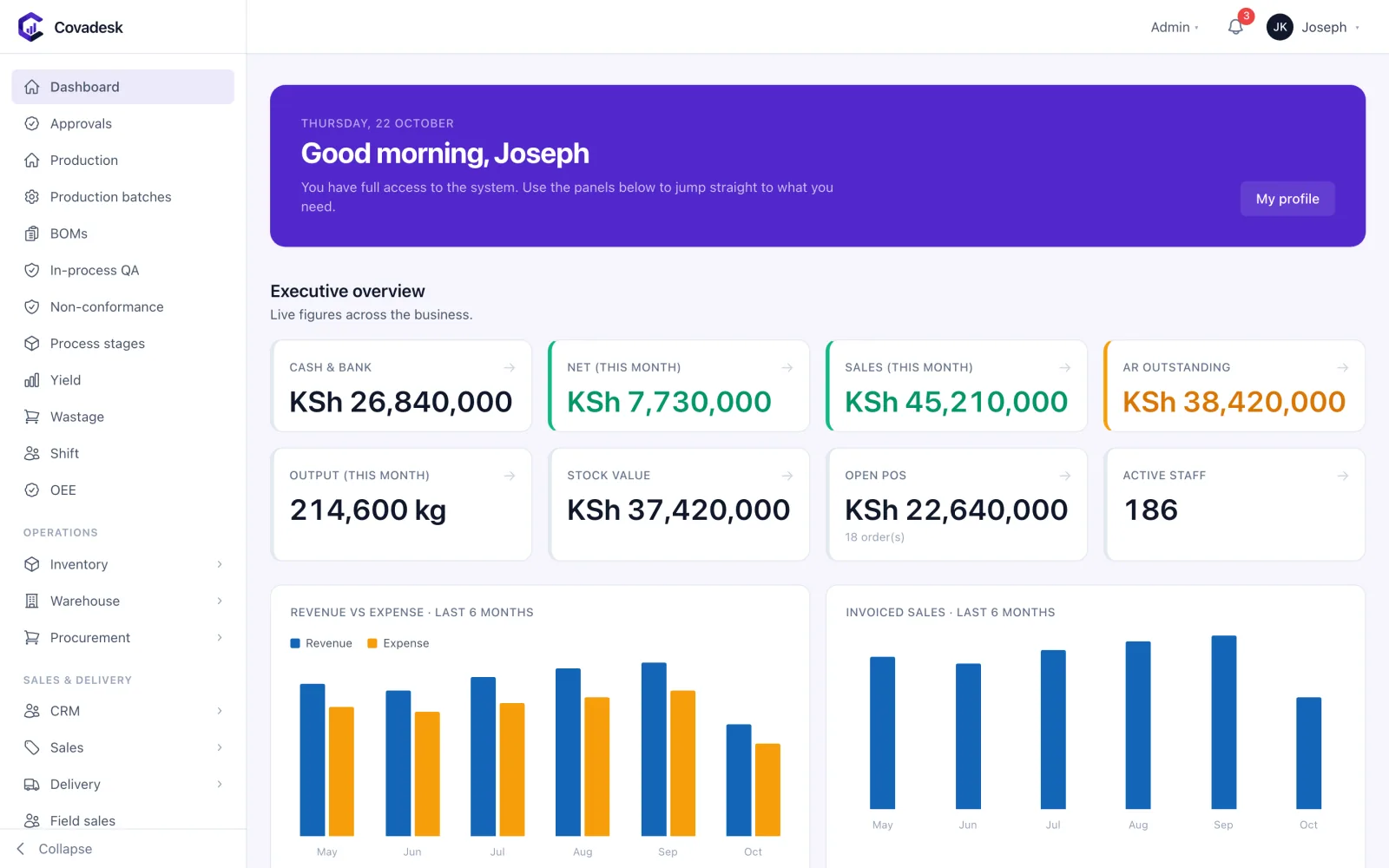
Cash, sales, receivables, stock, output and people — live across every branch.
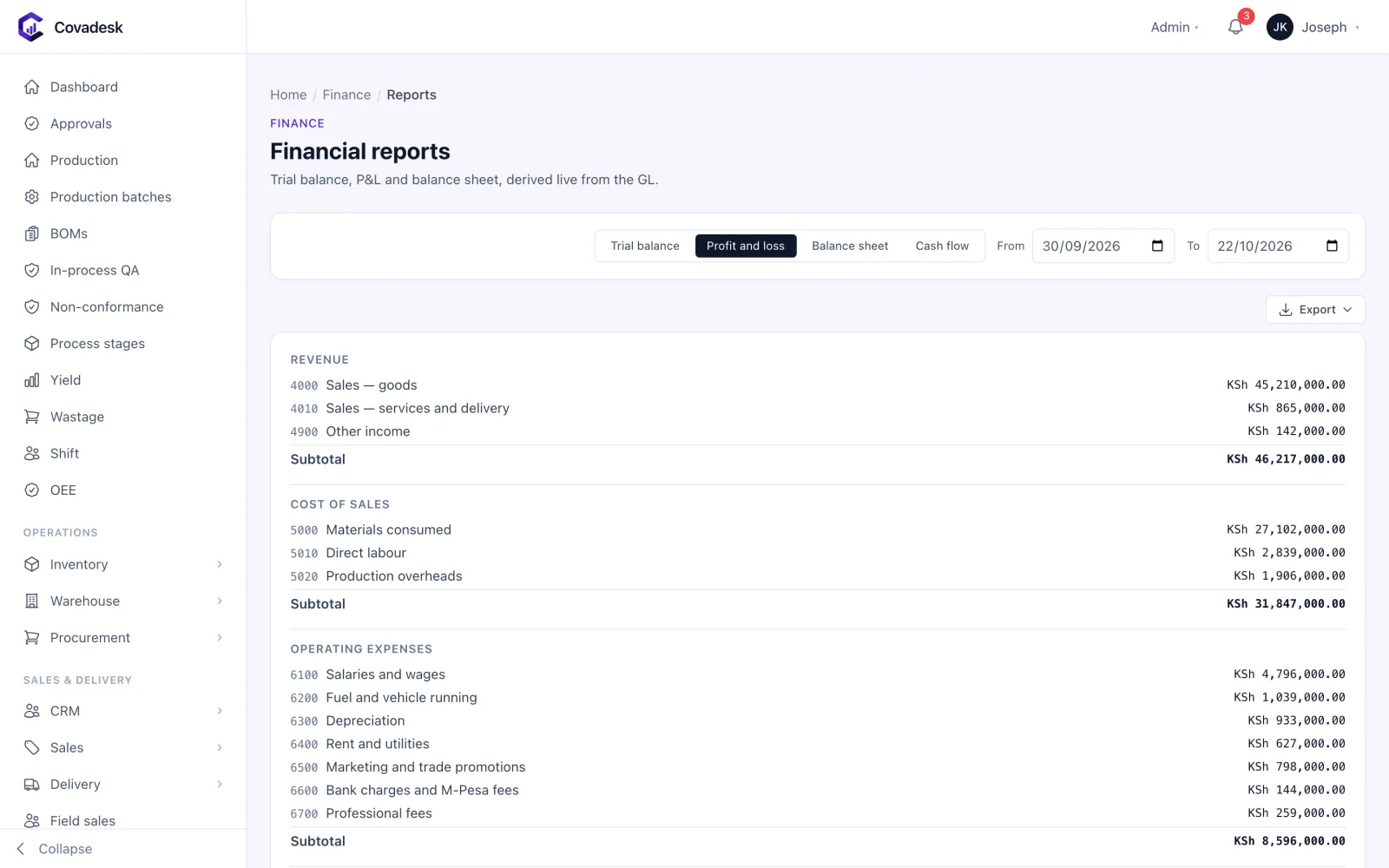
Profit and loss, balance sheet, trial balance and cash flow — straight from the ledger every module posts to.
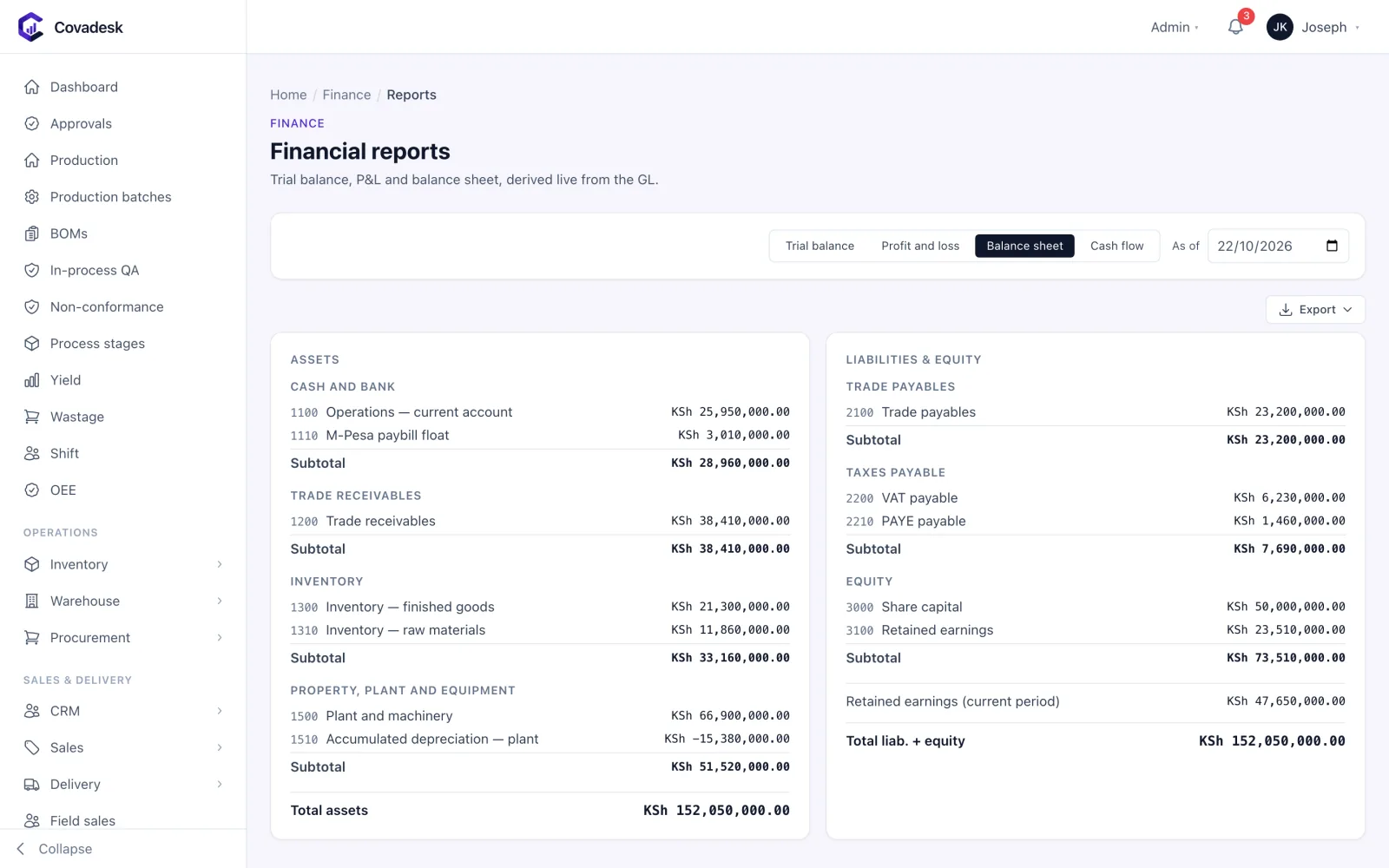
Assets against liabilities and equity as at today, built from the same ledger as the profit and loss — and checked to balance.
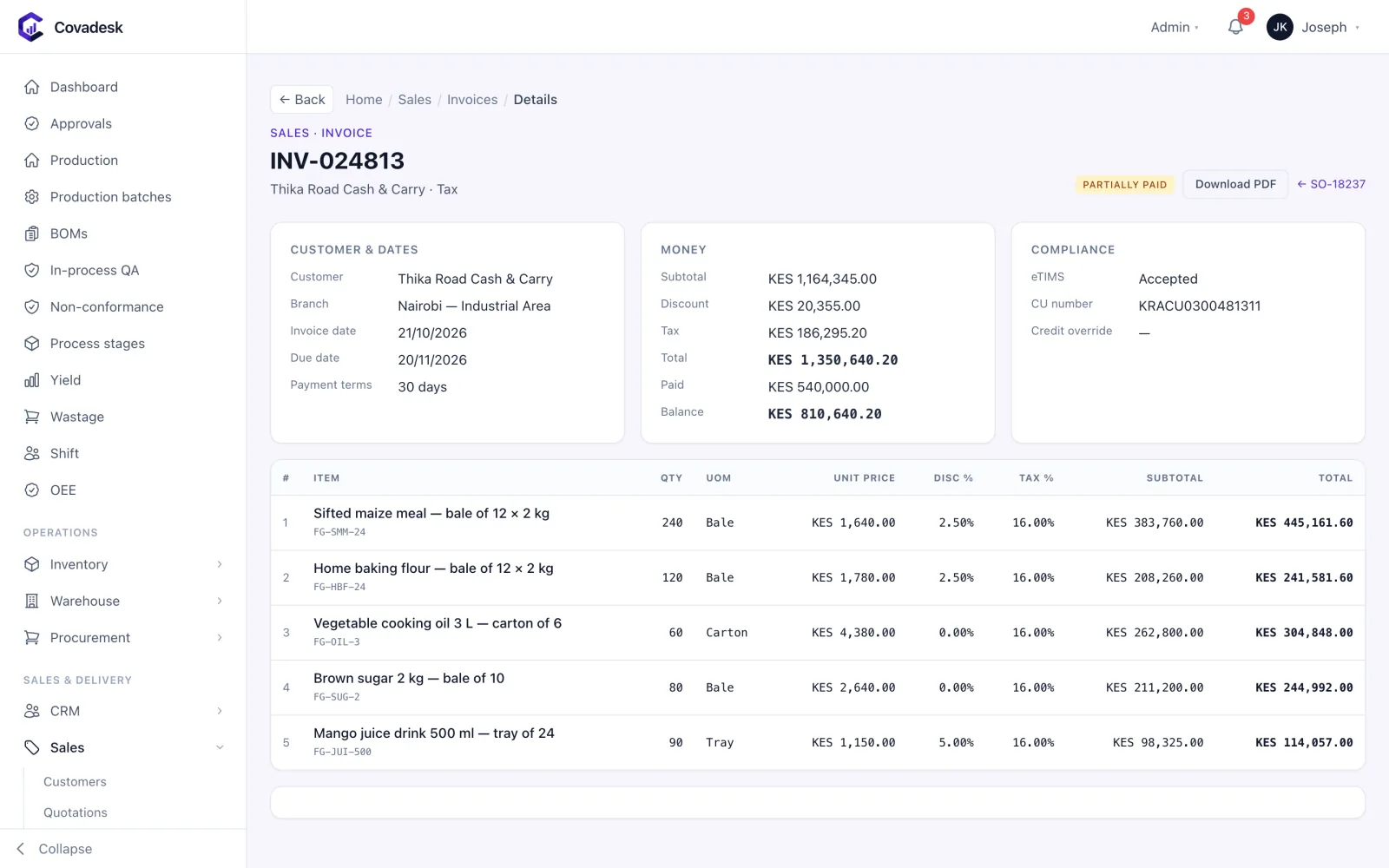
One invoice as the customer and KRA see it: lines, discounts and VAT, what has been paid, and the eTIMS control unit number it was signed with.
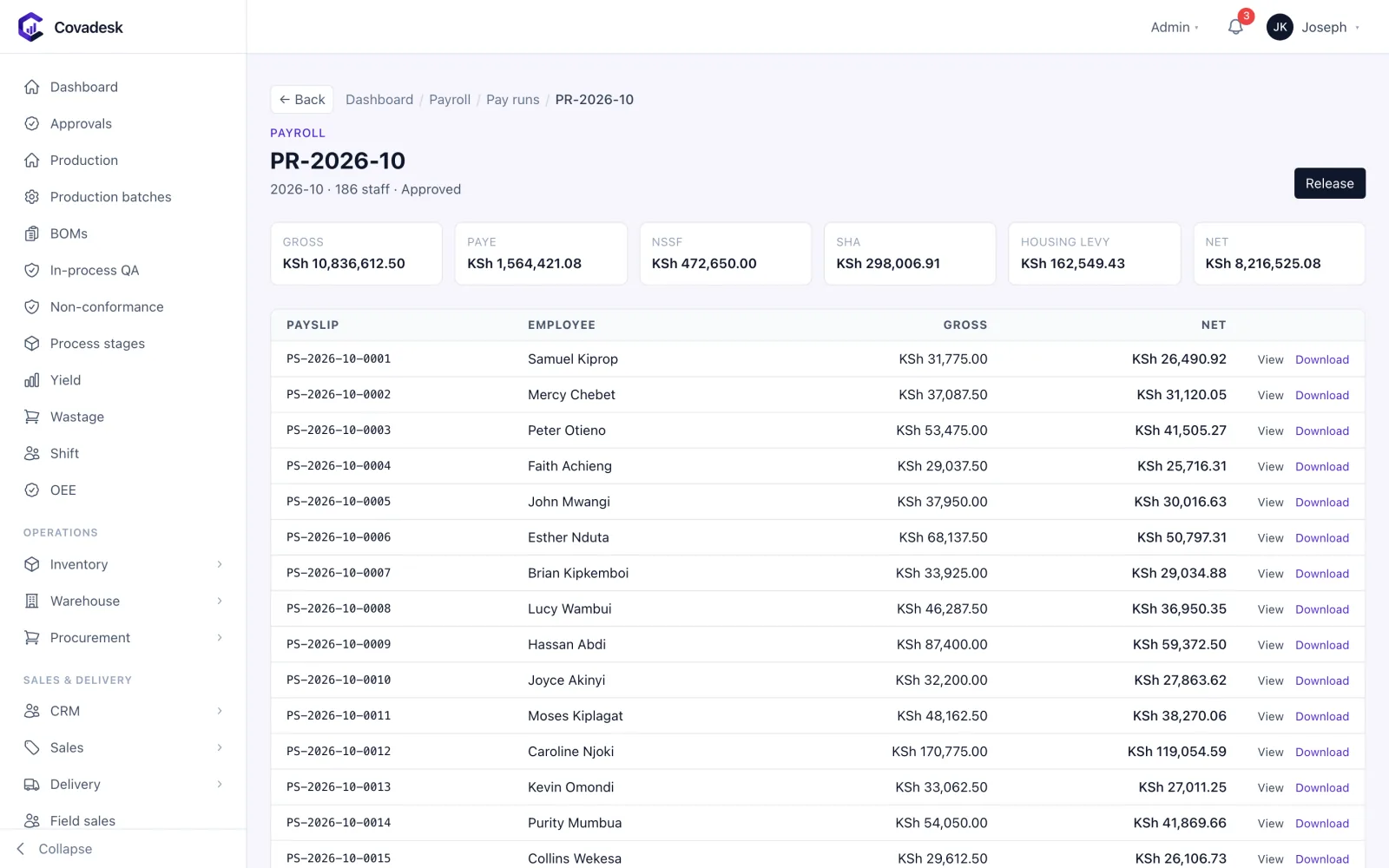
October’s payroll for 186 people: gross, PAYE, NSSF, SHA, Housing Levy and net, approved before a single shilling is released.
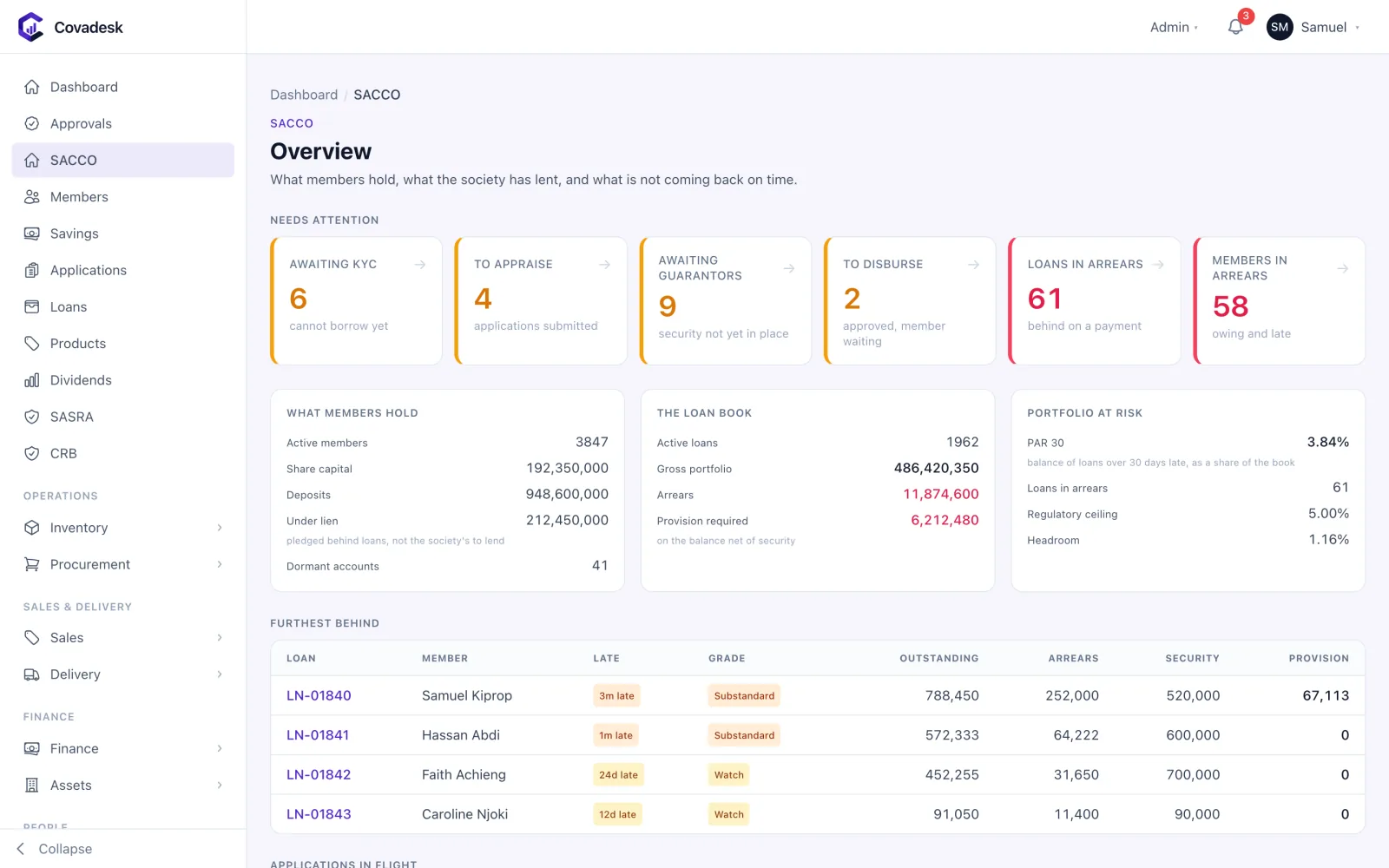
What members hold, what the society has lent, and what is not coming back on time — with PAR 30 against the ceiling.
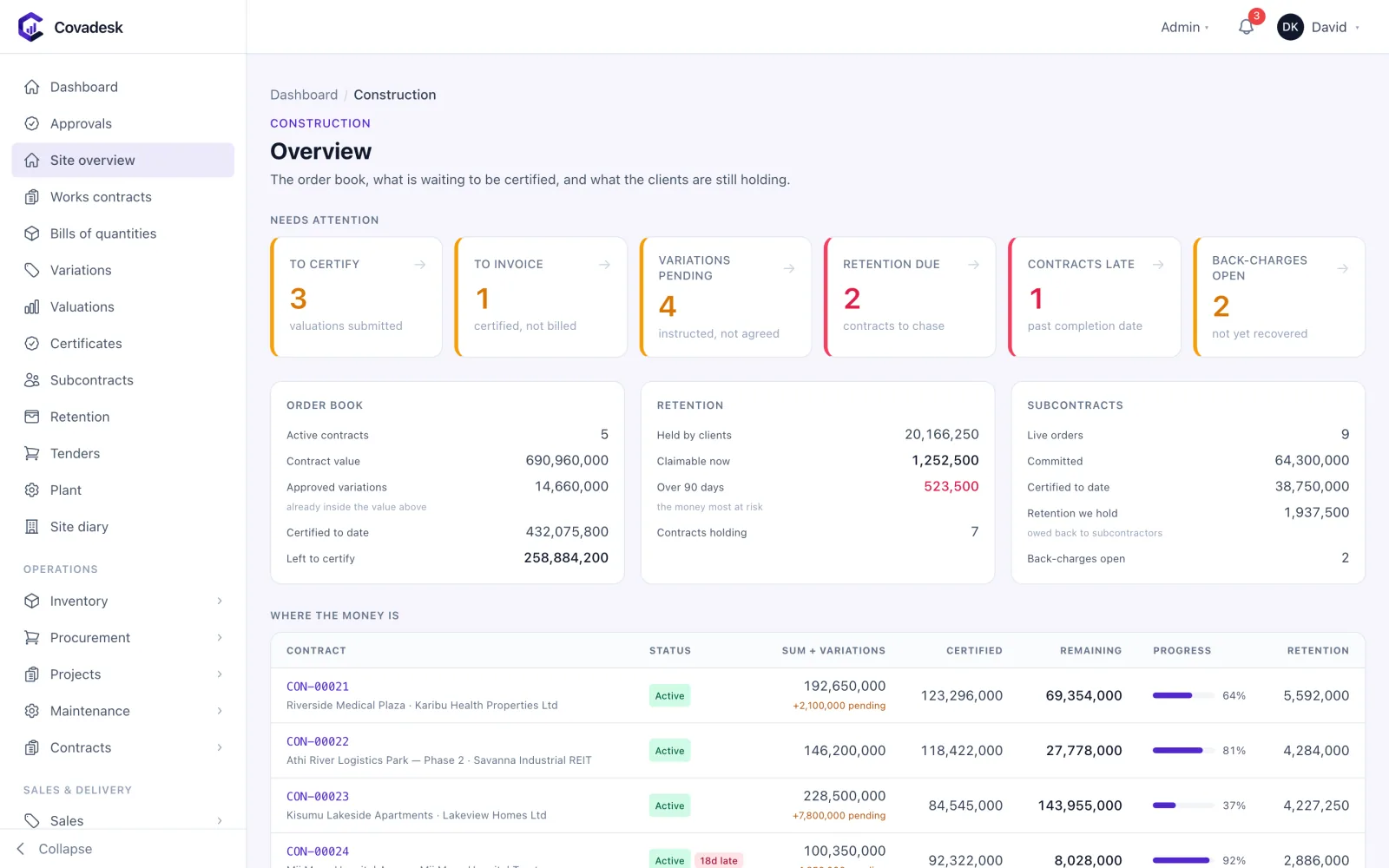
The order book, what is waiting to be certified, and what the clients are still holding.
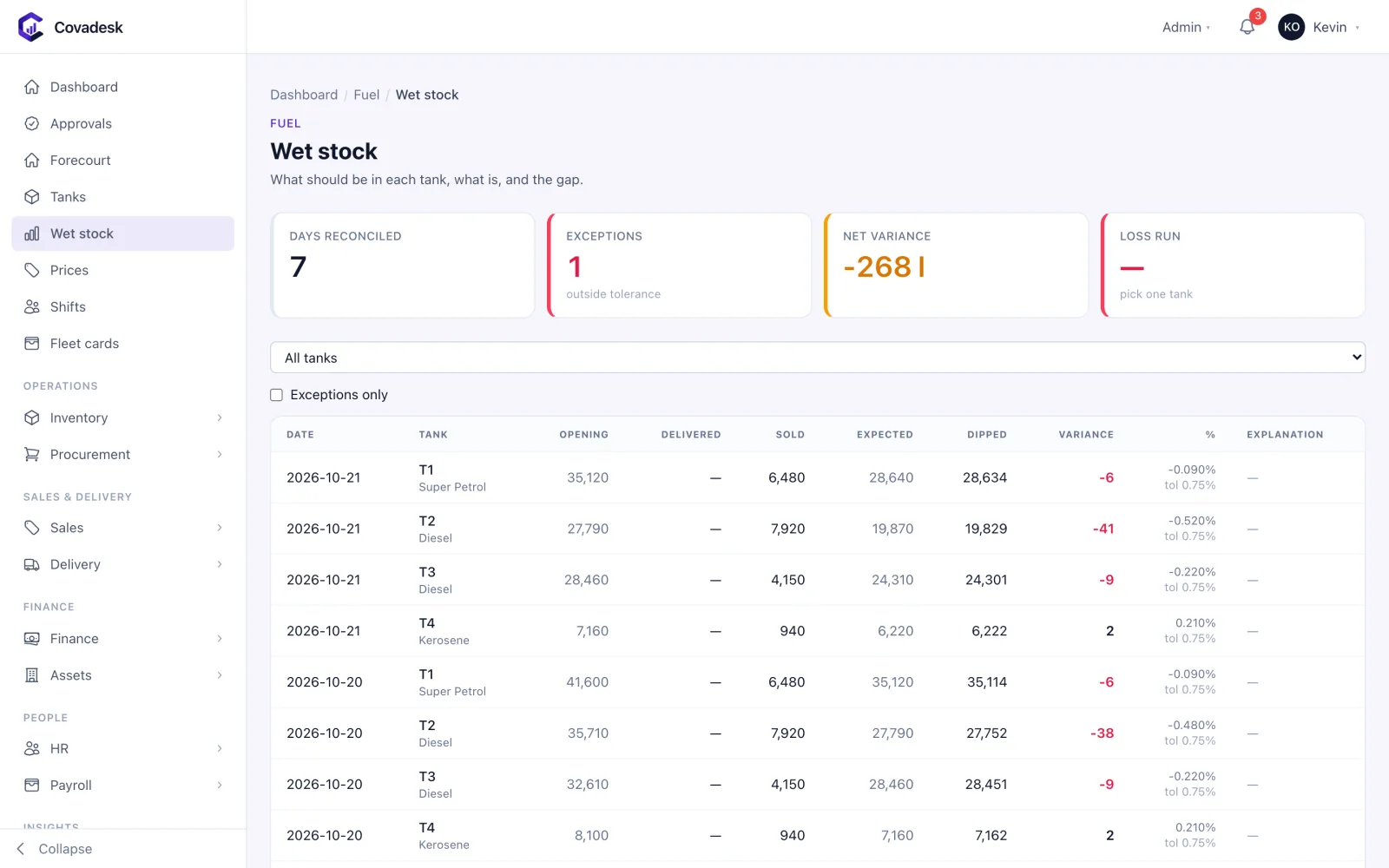
Opening, delivered, sold, expected and dipped — per tank, per day, with the variance judged against tolerance.
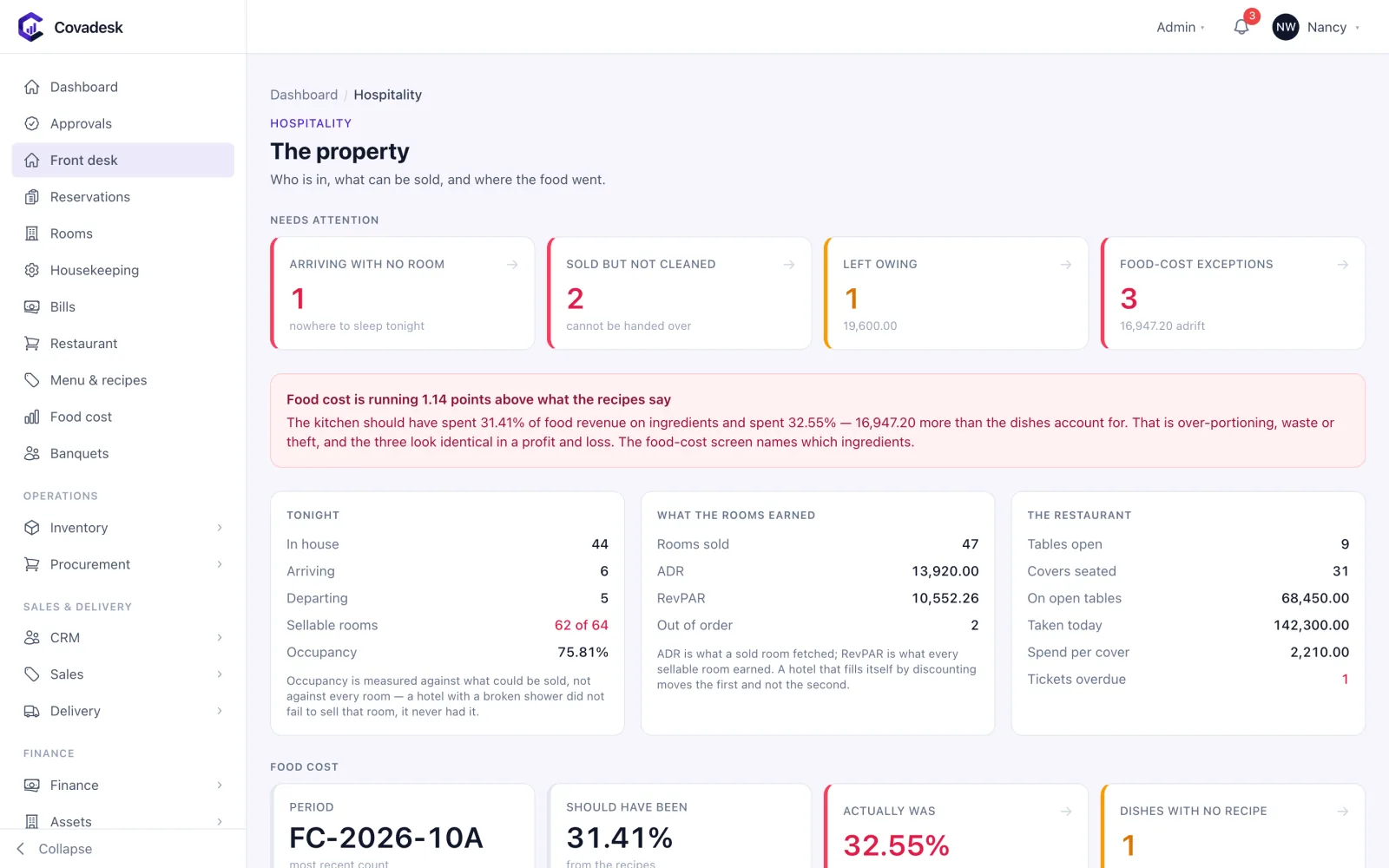
Who is in, what can be sold, and where the food went — occupancy, ADR, RevPAR and food cost.
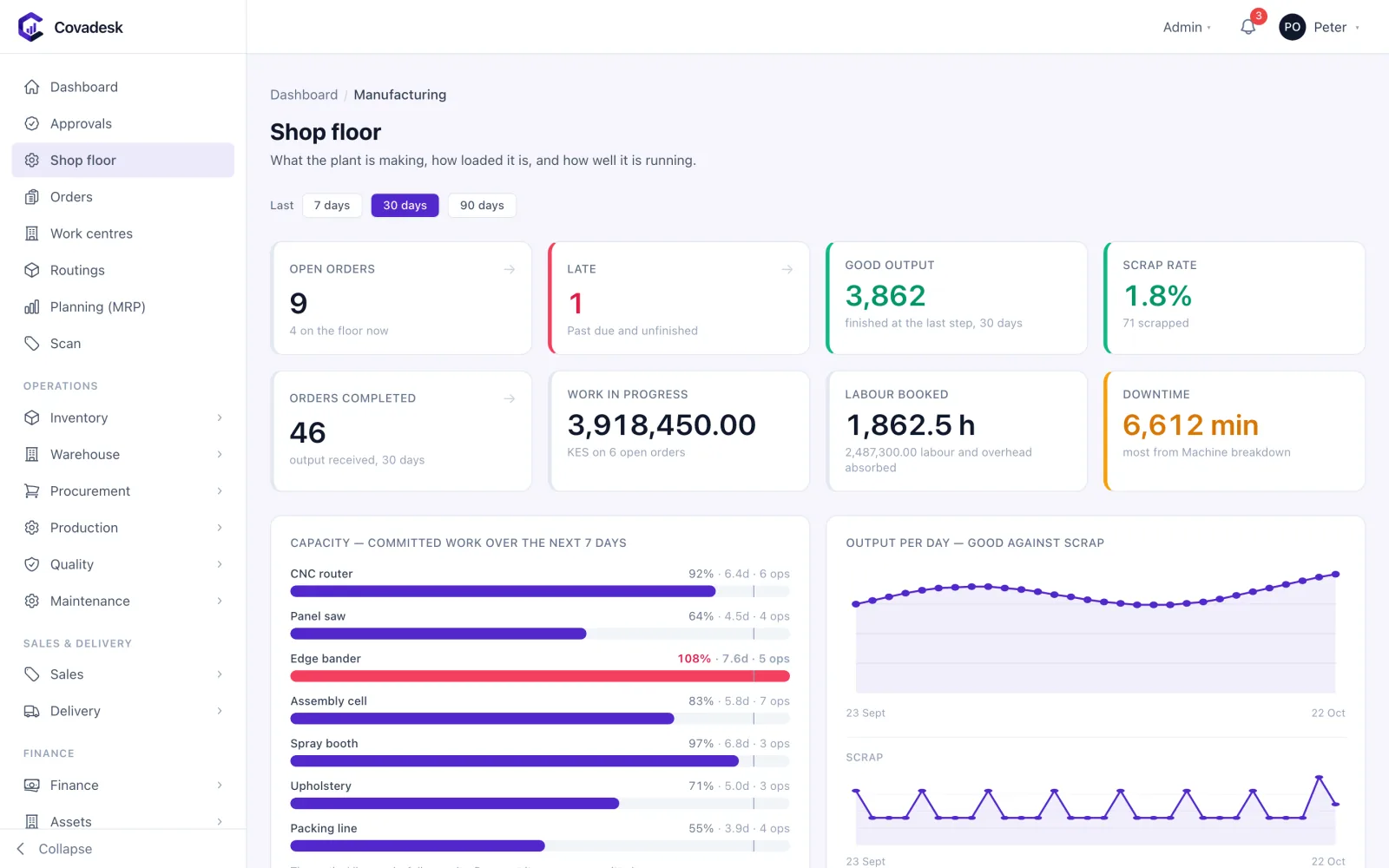
What the plant is making, how loaded it is, and how well it is running.
Why teams switch
The problem was never effort. It was the gaps between your systems.
Growing businesses don’t fail on hard work — they fail on reconciliation. Covadesk removes the seams where numbers drift apart.
Stock figures argue with the finance report
Every stock movement posts to the ledger as it happens — one number, both places.
Purchase approvals live in WhatsApp
Routed approvals with limits, delegation and a timestamped trail on every document.
Payroll rebuilt in Excel each month
Pay runs calculate PAYE, NSSF, SHIF and Housing Levy, then emit the filing files.
Branch managers email spreadsheets to HQ
Every branch enters once; group reports roll up instantly and drill back down.
Nobody knows what a batch actually cost
Batch costing tracks materials, yield and extraction rate through every process stage.
Field reps report visits from memory
GPS check-ins and geofenced visits, with orders captured on the rep’s phone.
Who it’s for
ERP for 16 industries, each pre-configured
Pick your industry and Covadesk switches on the right modules from day one. Every pack includes the backbone — procurement, inventory, sales, finance, HR, payroll, assets, delivery, reports and integrations — plus the modules that industry needs.
Grain Milling & Feed
From the weighbridge to the silo, every kilo accounted for
Explore →Manufacturing (Discrete)
Work orders, routings and MRP for assembled products
Explore →FMCG Manufacturing & Distribution
Batch and process production with yield you can trust
Explore →Retail & Supermarket
Single or multi-store retail with POS, promotions and loyalty.
Explore →General Trading / Wholesale
Buy-and-sell distribution and wholesale trading.
Explore →Distribution / Route-to-Market
Freight booked, moved, delivered and billed
Explore →Construction & Contracting
Contracts, BOQs and certificates — the money on every site
Explore →Real Estate & Property
Leases, rent and arrears across your whole portfolio
Explore →SACCO / Microfinance
Members, savings and loans — with SASRA returns built in
Explore →Logistics / Transport / 3PL
Freight booked, moved, delivered and billed
Explore →Agriculture & Agribusiness
What is in the ground, what it is costing and what it yields
Explore →Fuel Stations & Petroleum
Wet stock, pumps and shifts reconciled every day
Explore →Automotive Workshops & Dealers
Job cards the customer approved, parts that were fitted
Explore →Professional Services
Time into WIP, WIP into invoices, invoices into cash
Explore →NGO / Non-Profit
Restricted funds that cannot be overspent
Explore →Hospitality
Rooms, restaurant and food cost on one system
Explore →
Don’t see your industry? Talk to us — the backbone fits most businesses, and packs are configuration, not custom code.
What Covadesk does
34 modules live today. Switch on only what you need.
Modules are entitlements, not separate products. Start with stock and sales, add finance and payroll when you’re ready — same data, no re-implementation.
The backbone — in every pack
Procurement to payroll on one database and one chart of accounts.
Procurement
OperationsBuy with control, from requisition to supplier payment
- Purchase requisitions routed for approval by value, branch and role
- Requests for quotation with side-by-side supplier comparison and award
- Purchase orders that inherit item VAT rates and approved prices
Inventory
OperationsOne stock figure that finance and the store agree on
- Multi-warehouse stock levels, by item, location and batch
- Batch and expiry tracking with QA holds that block issue until released
- Inter-branch and inter-warehouse transfers with in-transit stock
Sales
CommercialQuote, sell, invoice and collect in one flow
- Quotations that convert to sales orders, delivery notes and invoices
- Counter POS and counter sales with cash, M-Pesa, card and voucher tenders
- Price lists and customer categories with credit limits enforced at order time
Finance & Accounting
FinanceA general ledger every module posts into as it happens
- Chart of accounts, accounting periods and period close
- Journals with approval, plus automatic postings from every module
- Bank accounts, statement import and bank reconciliation
Human Resources
PeopleYour people, their records and their requests in one place
- Employee records with contracts and organisation structure
- Leave policies, balances, requests and approvals — with self-service
- Attendance capture and shift rosters
Payroll
PeopleKenyan payroll that is right the first time
- Pay runs with maker-checker approval before release
- PAYE on current KRA bands with personal relief
- NSSF, SHIF and Affordable Housing Levy calculated per employee
Fixed Assets
FinanceA fixed asset register your auditor will sign
- Asset register by category, location and custodian
- Scheduled depreciation posted to the ledger
- Disposals with gain or loss calculated and booked
Delivery & Fleet
OperationsGet orders out of the gate and onto the road
- Dispatch runs that load delivery notes onto a vehicle and driver
- Vehicle and driver registers with documents and expiry dates
- Delivery routes and run status from loading to complete
Reports & Analytics
InsightsAnswers across every module, without exporting to Excel
- Executive dashboard with cash, sales, stock, output and receivables
- Ready-made payroll, HR, sales, stock and finance reports
- Saved reports, with exports to CSV, Excel and PDF
Integrations
SettingsConnected to the systems Kenyan businesses depend on
- KRA eTIMS invoice and credit-note transmission with retry and a send log
- M-Pesa C2B, STK Push and B2C through Daraja, matched to customer accounts
- SMS and email notifications
Cross-industry modules
Shared capabilities many industries switch on.
CRM
CommercialA sales pipeline that ends in a real invoice
- Leads, contacts and accounts linked to the customer ledger
- Opportunity pipeline by stage with weighted forecast and win rate
- Follow-ups and activities assigned to owners with due dates
Projects & Job Costing
OperationsKnow what every job costs while it is still running
- Projects with budgets, cost codes and work breakdown
- Timesheets costed at labour rates
- Job costing from purchases, stock issues and labour
Warehouse Management
OperationsBin-level control inside the warehouse
- Visual bin map by zone, with occupancy and fill levels
- Directed putaway and picking
- Cycle counts by bin and a full scan log
Manufacturing (Work Orders & MRP)
OperationsWork orders, routings and MRP for assembled products
- Manufacturing orders with priority, due date and progress
- Routings across work centres with capacity and cost rates
- Material requirements planning that proposes what to buy and make
Quality Management (QMS/LIMS)
OperationsQuality evidence for every batch, supplier and complaint
- Inspection plans and inspections on receipt, in process and before dispatch
- Intake tolerances, measuring instruments and calibration
- Certificates of analysis issued per batch
Maintenance (CMMS)
OperationsMaintenance that happens before the breakdown
- Equipment register linked to the fixed asset register
- Preventive service schedules that raise work orders on time
- Maintenance work orders with spares drawn from stock
Contract Management
CommercialEvery agreement, obligation and renewal date tracked
- Customer and supplier agreements in one register
- Obligations, rate agreements and renewal reminders
Documents
OperationsDocuments attached to the records they belong to
- Central register — attach files to any record
- Versioning and an archive
- Expiry watch for licences, permits and insurance
Customer & Supplier Portals
SettingsLet customers serve themselves
- Customer self-service for account statements, orders and support tickets
- Tenant view of leases and rent; client view of construction certificates
- Shipper tracking of consignments and proof of delivery
Helpdesk / Service
CommercialService tickets with SLAs you can actually see
- Ticket queue with priority, owner and status
- SLA targets with breach tracking
BI & Workflow Builder
InsightsBuild your own reports and approval rules — no code
- Report builder over any module’s data, with filters and exports
- Custom dashboards that arrange the figures you check daily
- No-code approval-rule designer for value and role thresholds
Industry modules
Built for the way a specific industry works.
Production (Batch/Process)
OperationsBatch and process production with yield you can trust
- Bills of materials and process stages with approval
- Production batches from planned to closed, with actual input and output
- Premix and fortification recording
DigiSales (Field Sales)
CommercialField sales with GPS proof of every visit
- Live rep map with GPS check-ins and geofenced customer visits
- Orders taken on the rep’s phone, online or offline
- Visit, order value and conversion figures for the day
Milling Intake & Weighbridge
OperationsFrom the weighbridge to the silo, every kilo accounted for
- Weighbridge tickets — gross, tare and net captured at the gate
- Intake sampling and grading against moisture and quality tolerances
- Grade-based pricing and accept or reject decisions with reasons
Construction & Contracting
OperationsContracts, BOQs and certificates — the money on every site
- Contracts with sum, variations, completion dates and retention
- Bills of quantities and measured valuations per period
- Interim payment certificates that raise real invoices
Real Estate & Property
OperationsLeases, rent and arrears across your whole portfolio
- Property and unit register with occupancy and vacancy
- Leases with renewal and expiry tracking
- Monthly rent runs that issue tenant invoices in one batch
SACCO / Microfinance
FinanceMembers, savings and loans — with SASRA returns built in
- Member register with KYC status, share capital and deposits
- BOSA and FOSA savings accounts with liens against loans
- Loan applications with eligibility, guarantors and appraisal
Logistics / 3PL
OperationsFreight booked, moved, delivered and billed
- Consignments with weight, value and status from booked to invoiced
- Trips with vehicle, driver, route and payload
- Waybills and proof of delivery
Agriculture & Agribusiness
OperationsWhat is in the ground, what it is costing and what it yields
- Farms and plots with area, tenure and irrigation
- Crop cycles with planting, inputs, cost per acre and harvest
- Varieties and yield per acre against expectation
Fuel Stations & Petroleum
OperationsWet stock, pumps and shifts reconciled every day
- Tank register with fill level, capacity and dead stock
- Daily wet-stock reconciliation — opening, deliveries, sales, dips, variance
- EPRA price cycles with pump prices checked against the cap
Automotive Workshops
OperationsJob cards the customer approved, parts that were fitted
- Estimates sent to the customer and approved — by them or on their behalf
- Job cards that flag any work done without approval
- Workshop bays, technicians and standard labour times
Professional Services
OperationsTime into WIP, WIP into invoices, invoices into cash
- Engagements with fee basis, ceilings and rate cards
- Work in progress valued at the rate agreed when the work was done
- Bills issued as real invoices, with write-offs approved by a partner
NGO / Donor-Funded
FinanceRestricted funds that cannot be overspent
- Grants with donor, award, burn rate and end date
- Restricted and unrestricted funds with available balance
- Auditable shared-cost allocation rules with approval
Hospitality
OperationsRooms, restaurant and food cost on one system
- Reservations, check-in and check-out with room assignment
- Room types, rates and housekeeping status
- Guest folios with charges posted from every outlet
On the roadmap
- Education
Compliance, handled
Kenyan statutory obligations built in — not bolted on
Most ERPs sold here were built somewhere else and localised later. Covadesk was written against KRA and NSSF rules from the start, so compliance is a setting, not a consulting project.
- KRA eTIMS
- Sales invoices and credit notes transmit to eTIMS with retry and a transmission log, so every tax invoice is accounted for.
- Payroll statutory
- PAYE on current bands with personal relief, NSSF, SHIF and the Affordable Housing Levy — calculated per pay run and exported as filing files.
- M-Pesa
- Daraja and C2B integration matches incoming payments to customer accounts and open invoices, so receipting stops being manual.
- VAT & withholding
- VAT and withholding tax handled at the transaction line, with the returns data available from the ledger rather than rebuilt each period.
Trust & control
Built so finance can actually sign off on it
An ERP is only worth running if the numbers stand up to an audit and the wrong person can’t change them.
Tenant isolation at the database
Each organisation’s rows are fenced off with PostgreSQL row-level security, enforced inside a scoped transaction — not a filter an application bug can skip.
Permissions down to the action
Roles map to granular permission keys like purchase_order:approve_l1. Users see only the branches, warehouses and screens they are entitled to.
Every change is audited
Creates, updates and deletes on registered tables write a diff with the actor and timestamp. Answer “who changed this price?” in seconds.
Approvals that match your limits
A generic approval engine routes documents by value, branch and role — multi-level where you need it, automatic where you don’t.
Getting started
Live in weeks, not quarters
ERP rollouts fail when they try to change everything at once. We sequence it so you get value from the first module before the second one starts.
- 01
Pick your industry
Choose from 16 industry packs. Covadesk enables the right modules, chart of accounts and document numbering automatically.
- 02
Bring your data across
Import items, customers, suppliers, employees and opening balances from your spreadsheets or current system.
- 03
Set roles and approval limits
Map your org structure to branches and warehouses, then set who approves what and up to which value.
- 04
Run parallel, then cut over
Run a month alongside your existing process, reconcile, and switch. Your team is trained by doing the real work.
Questions
Frequently asked questions
What is ERP software?
ERP (enterprise resource planning) software runs a business’s core operations — buying, stock, production, sales, finance, HR and payroll — in one system with one database. Instead of reconciling spreadsheets and separate apps, every department works from the same numbers, and every transaction posts to the accounts as it happens.
What is Covadesk?
Covadesk is a cloud ERP built in Kenya. It covers procurement, inventory, production, sales, delivery, finance, HR and payroll, adds industry modules for sectors such as SACCOs, construction, property, fuel, hospitality and manufacturing, and includes DigiSales, an Android app for field sales teams.
Which industries is Covadesk built for?
Covadesk has dedicated packs for grain milling, discrete manufacturing, FMCG, retail, wholesale and general trading, distribution, construction, real estate, SACCOs and microfinance, logistics, agriculture, fuel stations, automotive workshops, professional services, NGOs and hospitality. Each pack switches on the modules that industry needs on top of the shared backbone.
Is Covadesk compliant with KRA eTIMS?
Yes. Sales invoices and credit notes are transmitted to KRA eTIMS, with automatic retry and a transmission log so every tax invoice is accounted for.
Does Covadesk handle Kenyan payroll deductions?
Yes. Payroll calculates PAYE on current KRA bands with personal relief, NSSF, SHIF and the Affordable Housing Levy, generates payslips and statutory return files, and posts the payroll journal to the general ledger.
Does Covadesk integrate with M-Pesa?
Yes. Covadesk connects to M-Pesa through Safaricom Daraja for C2B, STK Push and B2C payments, and matches incoming payments to customer accounts and invoices.
How is our data kept separate from other companies?
Every organisation is isolated at the database level with PostgreSQL row-level security, not just an application filter. Queries run inside a transaction bound to your organisation, so one tenant cannot read another tenant’s rows even if application code has a bug.
Can we start with just one module?
Yes. Modules are switched on per organisation. Many businesses start with inventory and sales, or HR and payroll, and add procurement, finance and their industry modules as they grow — on the same data, with nothing re-implemented.
Does Covadesk work across multiple branches and warehouses?
Yes. Branches, warehouses and cost centres are built in. Every transaction carries a branch, users are scoped to the branches they work in, and reports roll up across the group or drill into a single site.
Is there a mobile app for field sales reps?
Yes — DigiSales, for Android. Reps check in at customer locations with GPS and geofencing, take orders even without signal, and collect M-Pesa payments. Orders arrive in Covadesk as sales orders, and managers see live rep activity on a map.
How long does implementation take?
A single-branch business on the standard modules is typically live in two to four weeks: data import, chart of accounts and opening balances, user roles, then a parallel run. Multi-branch and manufacturing rollouts take longer, depending on how much history moves across.
See Covadesk running on your numbers
Book a 30-minute demo. Bring a real problem — a stock variance you can’t explain, a payroll run that takes three days — and we’ll show you how it works in Covadesk.
Prefer to talk? Call +254 117 390 922 or email info@fecn.co.ke